DNS Record Types Explained

I believe writing makes learning easier so I share simple Tech notes with diagrams
Introduction -
Many time as a beginner i had many questions while working on or using any website that when ever the website is searched/type on the browser what actually happens at the backend of this browser so that website appeares in seconds without any errors or mistakes everyone wants to know as a beginner that “How does a browser know where a website lives?“.
Here we already know that computers don’t understand “anywebsite.com“ as we humans understand. Computers understand the IP addresses like 142.250.75.208 (IPv4 or IPv6) now the real question is “if websites live at IP addresses then why do we type domain names?“ as the answer is DNS (Domain Name Server)
What is DNS ?
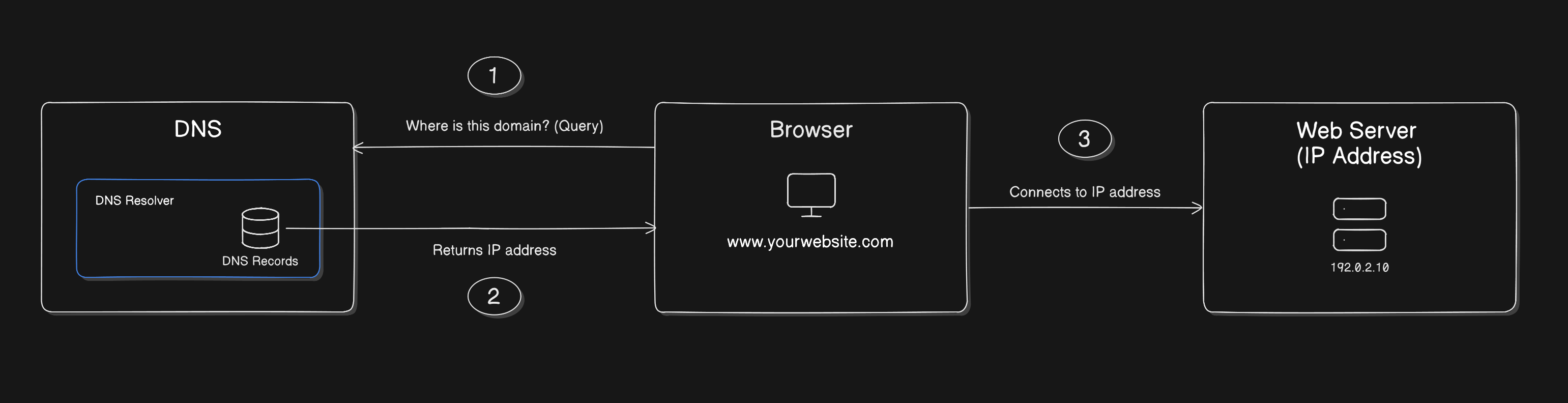
As DNS stands for Domain Name Server as for understanding purpose we can also call it phonebook of the internet lets take a example were i save a contact name of the owner of gaming shop as “Game Zone“ now whenever i calls him our phone actually calls the number behind it. Just like example what happens here is :
You type a name “google.com“
DNS gives the number (IP address)
Your browser uses that number to connect to the server.
Why DNS Records are Needed -
As name says “DNS Records” it actually keeps records which are like small instruction cards that answer questions like Where is this website hosted?, Who controls this domain?, Is this domain verified for Google or Cloudflare?, Where should email go?, etc. There are different types of records which has their own responsibilities.
What an NS Record is ?
Imagine your domain is “mywebsitename.com“ the internet first wants to know which DNS service is managing this domain here the NS Records answers as reply. As example think like your house is inside a society/building. If someone wants to deliver something to you, first they ask which building security gate is responsible for this house that gate/security is like NS. NS Records means the server that controls DNS for your domain, common example ns1.cloudflare.com ns2.cloudflare.com If your domain uses cloudflare DNS, the NS record points to cloudflare nameservers.

What an A Record is ?
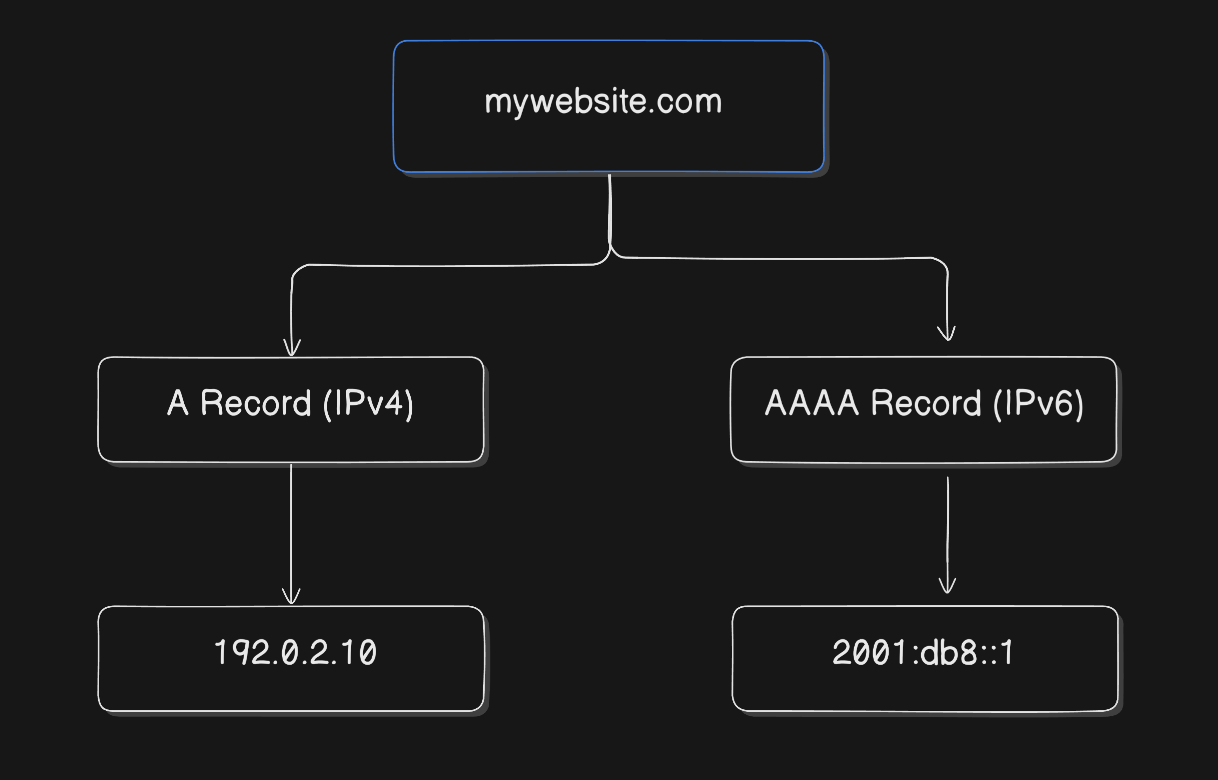
When the browser asks “Where is the website server?” then this domain points to this IPv4 address which looks like 192.0.2.10 lets take example that your house name is “Sweet Home“ but the real delivery location is House NO: 23, Street 6, City this is what A record does. So when a user opens your domain, mywebsite.com → 192.0.2.10 DNS returns the IP address, and the browser connects.
What an AAAA Record is ?
Its just a new version of A Records as we know “A = IPv4“ but “AAAA = IPv6“ now the question is whats new here why do we need IPv6 because addresses are limited (they can finish), and the internet needs more space. So IPv6 is like a bigger mywebsite.com → 2001:db8::1 modern address system were many websites keep both A and AAAA so both types of networks can reach them.
What a CNAME Record is ?
This CNAME record was confusing to me at starting time but here i have explained it in very simple way as possible. Waht CNAME does instead of pointing a name directly to an IP address it points a (lets take this domain name as “www.abc.com” ) Domain name to (another “abc.com“ which has A/AAAA) Real domain name and this points to the same IP address (were “www.abc.com“ domain name needs to point, that is if you type anyone “www.abc.com/abc.com“ it takes you to same IP address) its just like —What CNAME do —>Domain name [which needs to point IP address 192.0.2.10 ] —But it actually points to—> Another Domain name [which is Real Domain name which has A/AAAA which points to IP address 192.0.2.10 ]—which points to same IP —> IP address 192.0.2.10
if you type (www.abc.com)-www.abc.com (CNAME) → abc.com (A/AAAA) → IP
if you type (abc.com)-abc.com (A/AAAA) → IP
Think my real name as Moahmmed Zahed and as nickname Zahed and if someone says “Zahed“ they still means “Mohammed Zahed“ in this same way
Real domain —>
abc.comAnother name for Real Domain —>
www.abc.com
here both points the same website.

What an MX Record is ?
Have you ever thought that how emails find your mail server now this is totaly different job as we know A Record helps your website to load but MX Record helps your emails work. When someone sends you an email hello@mywebsite.com then the internet asks “Where should we deliver emails for this domain?” here the MX Record answers. Your website is your “home address” But email delivery is like “post office delivery” Your home and your post office can be different (That’s why many domains use Google Workspace / Zoho Mail) mywebsite.com MX → mail.google.com. MX Records contain “mail server destinations“ and its handle email delivery route

What an TXT Record is ?
TXT Record is like a note attached to your domain it is like extra information and verification It can store extra text for many purposes like domain verification, email security settings, ownership proof, etc. It is like putting a paper note on your door saying “This house belongs to Zahed”. It is commonly used to verify domain ownership when ever you connect domain to services like :
Google Search Console
Cloudflare
Hashnode
GitHub Pages
Microsoft
They say “Add this TXT record to prove you own the domain“ & also helps in protecting emails from spoofing.
How All DNS Records Work Together -
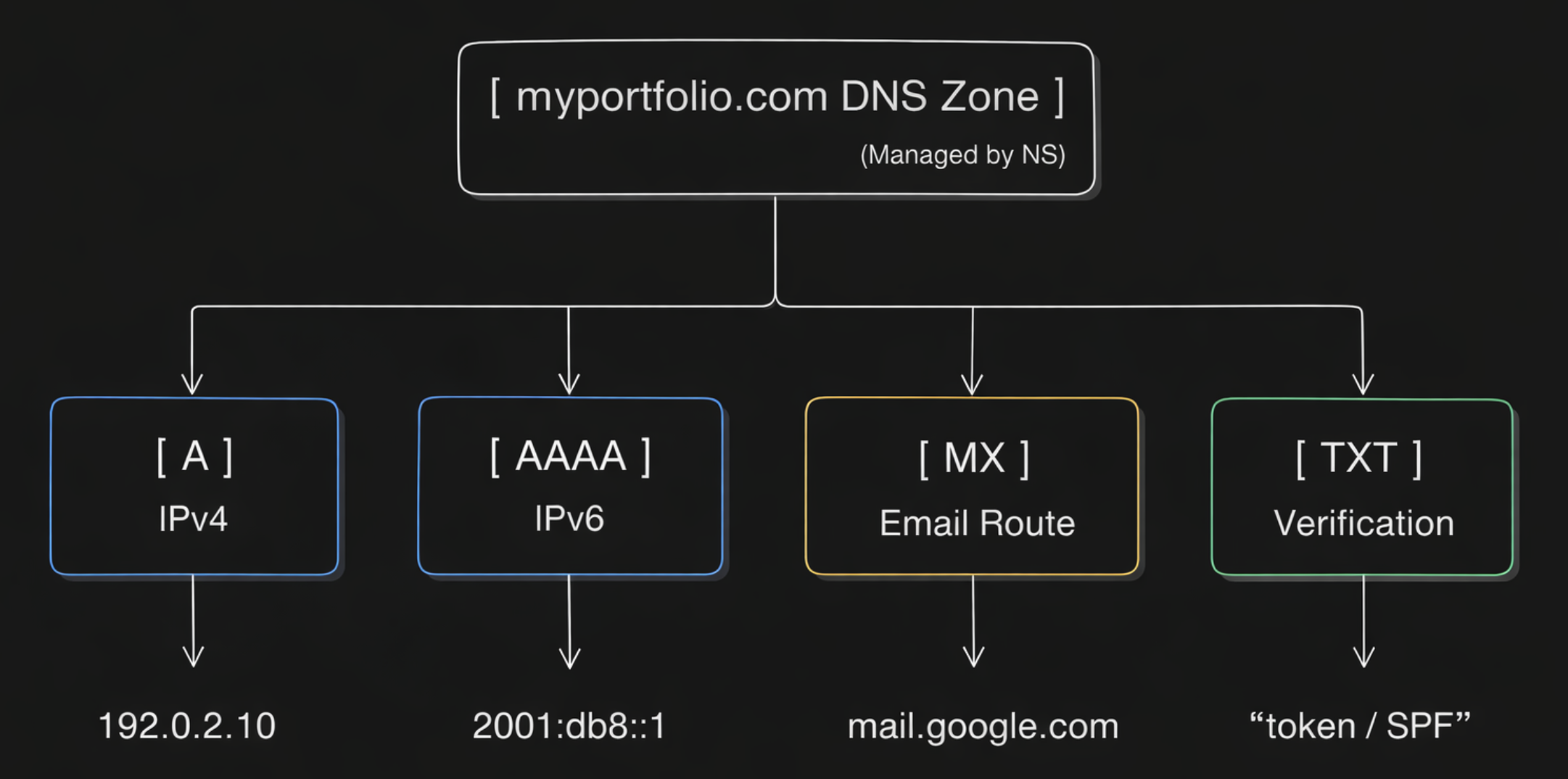
All DNS Records work together in many ways now let us imagine your small portfolio site setup as Domain we have myportfolio.com now you want :
Website opens on
myportfolio.comAlso works on
www.myportfolio.comEmail works like
contact@myportfolio.comDomain verified with Cloudflare / Google
Now your DNS might look like this :
NS Records - Point to your DNS provider (Cloudflare for example)
A Record -
myportfolio.com → 192.0.2.10CNAME Record -
www.myportfolio.com → myportfolio.comMX Record - Point to your email provider (Google/Zoho)
TXT Record - For domain verification & email safety
remember DNS is full set of small instructions, and together they make your domain work properly as for setup we need:


